
Download the ZoraBet App for Android & iOS and Claim Your Welcome Bonus
The ZoraBet PWA gives you instant access to sports betting and casino games directly from your mobile browser, with no app store required. New players can claim a 500% Slots Welcome Bonus up to 3000 EUR, a 500% Instant Games Welcome Bonus up to 3000 EUR, a 500% Live Casino Welcome Bonus up to 3000 EUR, and a 500% Sport Welcome Bonus up to 3000 EUR. Tap the button below to install the app and activate your bonus today.
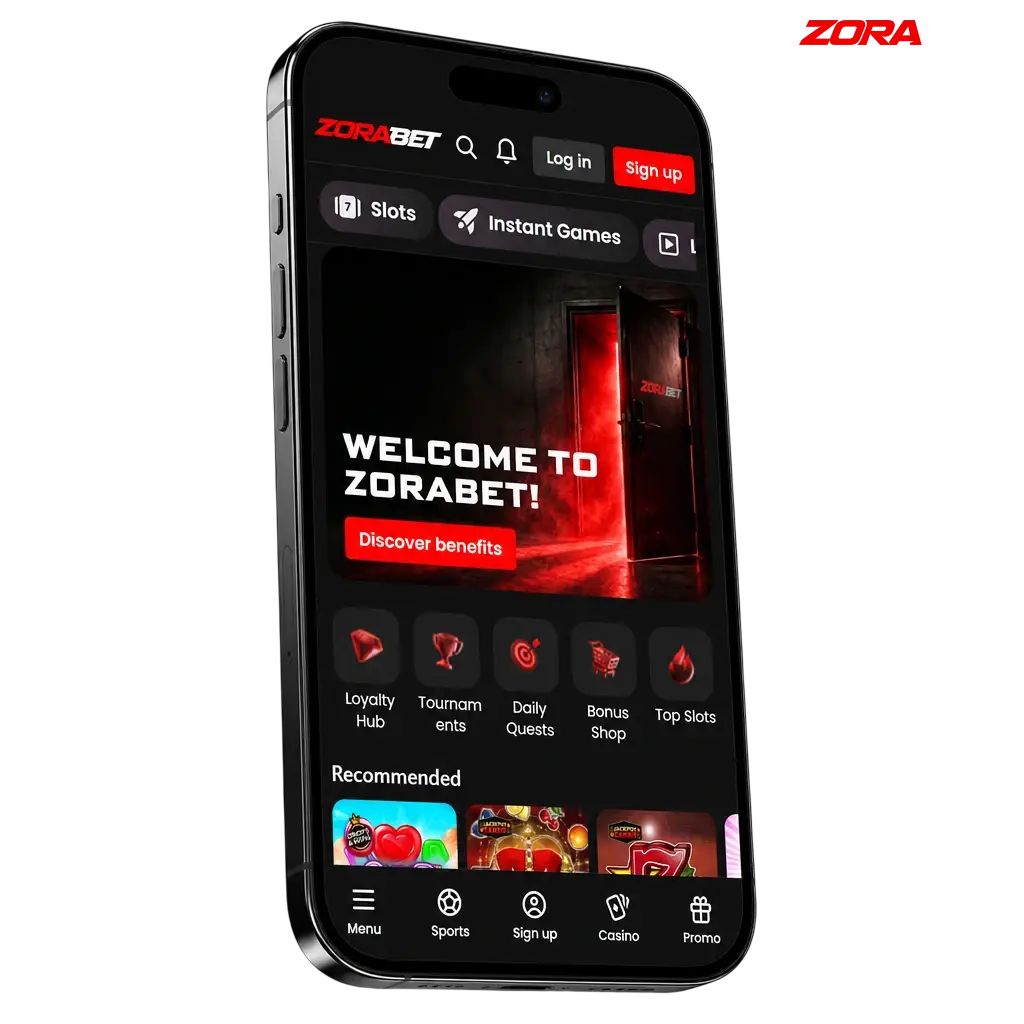
ZoraBet App at a Glance
The ZoraBet application is a Progressive Web App (PWA) compatible with all major Android and iOS devices, requiring no download from the Google Play Store or Apple App Store. It covers sports betting, live casino, slots, and instant games within a single mobile platform. The table below summarizes the key details players in Serbia need before installing.
| Detail | Information |
|---|---|
| App Category | Sports Betting & Online Casino |
| License | Operates under applicable iGaming regulations |
| Supported OS | Android 8.0+, iOS 14.0+ |
| Latest Version | PWA (auto-updated via browser) |
| Release Date | 2026 |
| Download Cost | Free |
| App Languages | Serbian, English |
| Supported Countries | Serbia and other eligible markets |
| Welcome Bonus for Sports | 500% up to 3000 EUR |
| Welcome Bonus for Casino | 500% up to 3000 EUR (Slots, Live Casino, Instant Games) |
| Bet Types | Pre-match, Live, Accumulator, Single |
| Customer Support | Live Chat, Email |
A Look Inside the ZoraBet App Interface
The ZoraBet mobile interface is built around a clean, dark-themed layout that keeps navigation fast and predictable across all screen sizes. Key sections, including Sports, Casino, Live Casino, and your Account, are accessible within two taps from any screen, reducing the time between opening the app and placing a bet.
Install the ZoraBet PWA on Android in 5 Steps
The ZoraBet PWA installs directly from your mobile browser in under a minute, with no APK file or third-party store required. The process works on Chrome, Samsung Internet, and all Chromium-based Android browsers. Follow the five steps below to get set up.
Step 1: Tap the Android Download Button
Tap the “Download App for Android” button on this page to open the ZoraBet mobile site in your browser.
Step 2: Log In or Create an Account
Sign in to your existing account, or register a new one if you are a first-time player.
Step 4: Select “Add to Home Screen”
Tap “Add to Home Screen” from the menu, then confirm by tapping “Add” to place the app icon on your home screen.
Step 5: Start Betting and Playing
Once the icon appears on your home screen and you are logged in, you can place bets, spin slots, or join live casino tables immediately.
Android Devices Compatible with the ZoraBet PWA
The ZoraBet PWA runs on any Android device with a Chromium-based browser and Android 8.0 or higher installed. Performance has been confirmed on flagship and mid-range models from all major manufacturers available in Serbia. The table below lists the most popular compatible brands and models.
| Brand | Compatible Models |
|---|---|
| Samsung | Galaxy S24, S24+, S24 Ultra, S23, A55, A35, A25 |
| Sony | Xperia 1 VI, Xperia 5 VI, Xperia 10 VI |
| Huawei | P60 Pro, Nova 12, Mate 60 Pro |
| OnePlus | 12, 12R, Nord 4, Nord CE 4 |
| Oppo | Find X8, Reno 12 Pro, A60 |
| Pixel 9, Pixel 9 Pro, Pixel 8a | |
| Xiaomi | 14, 14 Ultra, Redmi Note 13 Pro, Redmi 13C |
| Poco | X6 Pro, M6 Pro, F6 |
Android Technical Requirements for the ZoraBet App
The ZoraBet PWA has minimal hardware demands, making it accessible on a broad range of Android devices, including budget models. Because it runs entirely through the browser, no additional storage is consumed by a traditional APK installation. You only need a stable internet connection, sufficient RAM, and a supported Android version to run the platform without performance issues.
| System Requirement | Specification |
|---|---|
| Operating System | Android 8.0 (Oreo) or higher |
| RAM | 2 GB minimum (4 GB recommended) |
| Storage Space | 100 MB free (for browser cache) |
| Browser | Chrome 89+, Samsung Internet 14+, or equivalent Chromium browser |
Install the ZoraBet PWA on iOS in 5 Steps
Apple users can add the ZoraBet PWA to their iPhone or iPad home screen directly through Safari, with no App Store visit required. The installation takes under 60 seconds and works on all iPhones running iOS 14.0 or higher. Follow the steps below to complete the setup.
Step 1: Tap the iOS Download Button
Tap the “Download App for iOS” button on this page to open the ZoraBet mobile site in Safari on your iPhone or iPad.
Step 2: Log In or Create an Account
Sign in to your existing account, or complete a quick registration if you are a new player.
Step 4: Select “Add to Home Screen”
Tap “Add to Home Screen” from the share menu, then confirm by tapping “Add” in the top-right corner.
Step 5: Open the App and Start Playing
Once the ZoraBet icon appears on your home screen and you are logged in, you can begin betting on sports, playing slots, or joining live casino tables right away.
Apple Devices Compatible with the ZoraBet iOS PWA
The ZoraBet PWA is fully compatible with all iPhones and iPads running iOS 14.0 or later, covering every Apple device released from 2020 onward. Safari on iOS supports PWA installation natively, so no third-party browser is required. The table below lists the supported Apple models.
| Brand | Compatible Models |
|---|---|
| Apple iPhone | iPhone 16, 16 Plus, 16 Pro, 16 Pro Max, 15, 15 Plus, 15 Pro, 15 Pro Max, 14, 14 Plus, 14 Pro, 14 Pro Max, 13, 13 Mini, 13 Pro, 13 Pro Max, 12, SE (3rd generation) |
| Apple iPad | iPad Pro 13-inch (M4), iPad Pro 11-inch (M4), iPad Air 13-inch (M2), iPad Air 11-inch (M2), iPad mini 7, iPad (10th generation) |
iOS Technical Requirements for the ZoraBet App
The ZoraBet PWA on iOS runs through Safari and requires no separate download or installation file. It is optimized for all iPhones from the iPhone 8 onward and all iPads released since 2019. Because all processing happens through the browser, the storage footprint is limited to Safari cache. A stable Wi-Fi or 4G/5G connection is recommended for live betting and live casino streams.
| System Requirement | Specification |
|---|---|
| Operating System | iOS 14.0 or higher |
| RAM | 2 GB minimum (3 GB recommended) |
| Storage Space | 100 MB free (for Safari cache) |
| Browser | Safari (latest version recommended) |
ZoraBet on Desktop: The PC Web Version
Players in Serbia who prefer a larger screen can access the full ZoraBet platform through any desktop browser, including Chrome, Firefox, Edge, and Opera. The desktop version mirrors all features available on mobile, covering sports betting, live casino, slots, instant games, and account management. No software download or plugin installation is required; simply navigate to the ZoraBet website and log in. The desktop layout expands to make use of the wider screen, displaying more markets, odds columns, and casino game thumbnails simultaneously. For players who switch between devices, the account balance, bet history, and bonus status sync instantly across desktop and mobile.
How to Register a ZoraBet Account Through the Mobile App
Creating a ZoraBet account via the PWA takes under three minutes. All fields are mobile-optimized, so the form is easy to complete on any smartphone screen. Follow the steps below.
- Open the ZoraBet PWA from your home screen or mobile browser and tap “Register”.
- Enter your personal details: full name, date of birth, email address, and phone number.
- Choose your preferred currency (EUR is available for Serbian players) and create a secure password.
- Accept the Terms and Conditions and confirm you are 18 years of age or older.
- Verify your email address by clicking the confirmation link sent to your inbox, then log in to access your account and claim your welcome bonus.
Bonuses Available to ZoraBet Mobile Players
All bonuses available on ZoraBet are fully accessible through the mobile app, with no reduction in bonus value compared to the desktop version. New players can activate multiple welcome offers across different product categories. Each bonus is applied to the relevant game vertical, allowing players to explore sports, slots, live casino, and instant games with boosted funds. Bonuses are credited automatically upon qualifying deposit, provided the minimum deposit threshold is met. Players should review the specific terms for each offer, including wagering requirements and game restrictions, before opting in.
Welcome Bonuses for New Players
ZoraBet offers four separate 500% welcome bonuses for new registrations in 2026, each tied to a specific game category. The breakdown is as follows:
| Detail | Slots Bonus | Instant Games Bonus | Live Casino Bonus | Sport Bonus |
|---|---|---|---|---|
| Type | Deposit Match | Deposit Match | Deposit Match | Deposit Match |
| Amount | 500% up to 3000 EUR | 500% up to 3000 EUR | 500% up to 3000 EUR | 500% up to 3000 EUR |
| Eligible Games | Slots | Instant Games | Live Casino tables | Pre-match and live sports |
| Validity Period | Check current terms on the Promotions page | Check current terms | Check current terms | Check current terms |
| Terms and Conditions | Minimum deposit required; wagering requirements apply; one bonus per category per player | Same conditions apply | Same conditions apply | Same conditions apply |
Keeping Your ZoraBet App on the Latest Version
Because ZoraBet operates as a PWA, updates are delivered automatically through your browser each time you open the app. There is no manual update process required on Android or iOS. To confirm you are on the latest version, simply close and reopen the app while connected to the internet. If you experience any display or performance issues, clearing your browser cache and reopening the PWA will load the most current version immediately. No visits to the Google Play Store or Apple App Store are needed at any point.
The Benefits of Running the Most Current Version
Each PWA update pushed by ZoraBet may include new game titles, revised odds formats, improved payment processing speeds, or security patches that protect your account and transaction data. Outdated cached versions of the app can occasionally display incorrect odds or fail to load newer features, directly affecting your betting experience. Security updates in particular are critical, as they address vulnerabilities that could otherwise expose your personal or financial information. Running the latest version also ensures compatibility with new payment methods as they are added to the platform in 2026.
How to Place a Bet on ZoraBet via Mobile
Placing a bet through the ZoraBet app takes under 60 seconds once you are logged in and have a funded account.
Open the ZoraBet PWA and navigate to the Sports section
Open the ZoraBet PWA and navigate to the Sports section from the bottom navigation bar.
Select your sport, competition, and match
Select your preferred sport, competition, and match, then tap the odds for the outcome you want to back.
Enter your stake amount in the bet slip
Your selection will appear in the bet slip; enter your stake amount in the designated field.
Review and confirm your bet
How to Remove the ZoraBet App from Your Device
Because ZoraBet is a PWA, removing it follows the same process as deleting any home screen shortcut on your device. On Android, press and hold the ZoraBet icon on your home screen, then select "Remove" or drag it to the trash icon that appears at the top of the screen. On iOS, press and hold the icon until it jiggles, tap the minus symbol, and confirm deletion; this removes the shortcut without affecting your account or any stored funds.
How to Log In to ZoraBet Through the Mobile App
Logging in to the ZoraBet app is a straightforward process that takes seconds on any mobile device. Follow the steps below.
- Open the ZoraBet PWA from your home screen or mobile browser.
- Tap the "Log In" button located in the top-right corner of the screen.
- Enter the email address and password you used during registration.
- Tap the "Sign In" button to access your account dashboard.
- If you have two-factor authentication enabled, enter the verification code sent to your registered phone number or email to complete the login.
- Once inside, your account balance, active bonuses, and betting history are immediately visible from the main dashboard.
Core Features of the ZoraBet Mobile App
The ZoraBet PWA consolidates sports betting, casino games, live dealer tables, and account management into a single mobile-optimized platform. The interface loads in under three seconds on a standard 4G connection, with no native installation required. Deposits and withdrawals are processed without leaving the app, covering all major payment methods available in Serbia. Live betting markets update continuously, covering over 30 sports disciplines. The notification system keeps players informed of odds changes, match results, and promotional offers in real time.
Live Betting on the ZoraBet App
The live betting section on ZoraBet covers more than 30 sports disciplines, including football (Srpska liga, UEFA competitions), basketball, tennis, and handball. Odds update with minimal latency, reflecting events on the field within seconds of occurrence. The in-play interface displays a live match tracker alongside the active markets, allowing you to follow the game and place bets from the same screen. Accumulator bets can be built using live selections combined with pre-match events. Live streaming is available for selected events directly within the app, subject to account login and applicable streaming rights. The bet slip auto-refreshes when odds change before your bet is confirmed, prompting you to accept the new price or cancel. All live bets are settled within minutes of the event concluding.
Casino Games on the ZoraBet App
The ZoraBet casino library includes slots, table games, instant games, and a dedicated live casino section, all accessible from the mobile app. Games load directly in the browser without requiring any plugin or secondary download. The live casino section features real dealers operating across multiple table variants, including roulette, blackjack, baccarat, and poker. Titles are supplied by established iGaming software providers, ensuring certified random outcomes and high-quality mobile graphics. The game lobby includes category filters for quick browsing across hundreds of titles. Progressive jackpot slots are included in the portfolio, with prize pools displayed in real time. Search functionality allows you to locate a specific title by name within two seconds.
Depositing Funds Through the ZoraBet App
Deposits on ZoraBet are processed directly within the mobile app, with no redirection to external payment portals required. The cashier section is accessible from the account menu in under two taps. Multiple payment methods are supported, covering bank transfers, credit and debit cards, and electronic wallets popular among Serbian players. All transactions are protected by SSL encryption. Processing times for most deposit methods are instant, meaning funds appear in your betting balance immediately after confirmation.
| Payment Detail | Information |
|---|---|
| Available Payment Methods | Bank Transfer, Visa, Mastercard, e-Wallets |
| Minimum Deposit | Check current limits in the cashier section |
| Maximum Deposit | Check current limits in the cashier section |
| Transaction Security | 128-bit SSL encryption |
| Processing Time | Instant for most methods |
Withdrawing Winnings Through the ZoraBet App
Withdrawal requests are submitted through the same cashier section used for deposits, keeping the process consolidated in one location. You can select your preferred withdrawal method, enter the amount, and submit the request without leaving the app. Identity verification (KYC) must be completed before the first withdrawal is processed, a standard requirement across licensed iGaming platforms. Withdrawal processing times vary by method, with e-wallets typically faster than bank transfers. All withdrawal data is transmitted using SSL encryption to protect your financial details.
| Payment Detail | Information |
|---|---|
| Available Withdrawal Methods | Bank Transfer, Visa, Mastercard, e-Wallets |
| Minimum Withdrawal | Check current limits in the cashier section |
| Maximum Withdrawal | Check current limits in the cashier section |
| Transaction Security | 128-bit SSL encryption |
| Processing Time | E-wallets: up to 24 hours; Bank Transfer: 3–5 business days |
Managing Your Profile on the ZoraBet App
The ZoraBet account profile is accessible from the top-right corner of the app on any screen. Your current balance, available bonus funds, and any wagering progress are displayed on the profile dashboard. The transaction history section logs all deposits, withdrawals, and bonus credits with exact timestamps and amounts. Personal details, including email address, phone number, and password, can be updated directly within the account settings tab. Responsible gambling tools, such as deposit limits and session reminders, are also managed from within the profile section. All account changes require password confirmation before they are saved, adding an additional layer of account security.
Push Notifications on the ZoraBet App
The ZoraBet PWA supports push notifications on both Android and iOS, delivered through the browser without requiring a native app install. Notification types include: upcoming match reminders for bookmarked events, odds boost alerts, promotional offer announcements, deposit and withdrawal confirmations, and account security alerts. You can customize which notification categories you receive from the account settings section. Notifications are delivered reliably as long as browser notification permissions are granted and the device is connected to the internet. To enable push notifications on Android, tap "Allow" when prompted after installation. On iOS, push notification support for PWAs is available from iOS 16.4 onward.
Security Protocols Protecting Your ZoraBet Account
ZoraBet applies 128-bit SSL (Secure Socket Layer) encryption across all data transmitted between your device and the platform’s servers, covering login credentials, personal data, and payment information. Account registration requires email verification, ensuring that only the account owner can activate a new profile. Login security includes a password-protected access system, with account lockout mechanisms triggered after repeated failed login attempts to prevent unauthorized access. Payment transactions are processed through PCI DSS-compliant payment gateways, meaning your card details are never stored directly on ZoraBet’s servers. Two-factor authentication (2FA) is available as an optional layer for account login, sending a one-time code to your registered phone number or email address. KYC verification is required before withdrawals are processed, confirming the identity of the account holder and preventing fraudulent activity. All responsible gambling tools, including deposit limits and self-exclusion options, are protected by password confirmation to prevent unauthorized changes. Data protection practices comply with applicable privacy legislation governing iGaming operators.
Permissions the ZoraBet PWA Requests on Your Device
Because ZoraBet operates as a PWA rather than a native application, it requests significantly fewer device permissions than a standard Android APK or iOS app. Notification permission is requested at installation to enable push alerts for odds changes, match reminders, and promotional offers; this can be declined without affecting core app functionality. Camera and microphone access may be requested during KYC identity verification, specifically for document upload or live verification processes. Storage access allows the browser to cache app assets locally, reducing loading times on repeat visits and enabling partial offline browsing of the interface. Location permission is optional and may be used to verify geographic eligibility in accordance with regional licensing requirements. No permission grants ZoraBet access to your contacts, call logs, or unrelated device files. All permission requests are handled through your device’s native browser permission manager, giving you full control over what the app can access. You can review and revoke any granted permission at any time through your device’s browser settings.
FAQ
Is the ZoraBet app legal for players in Serbia?
ZoraBet operates under applicable iGaming licensing requirements. Players in Serbia should review the terms of service to confirm eligibility for their specific location before registering.
Does the ZoraBet PWA cost anything to download?
The PWA is completely free to install on both Android and iOS devices. No payment is required at any stage of the installation process.
Can I use the same account on mobile and desktop?
Yes. Your ZoraBet account, balance, bet history, and active bonuses are synchronized across all devices instantly.
Are the welcome bonuses available to mobile app players?
All four 500% welcome bonuses, covering Slots, Instant Games, Live Casino, and Sport, are fully available to players who register and deposit through the mobile PWA.
How long does a withdrawal take on the ZoraBet app?
E-wallet withdrawals are typically processed within 24 hours. Bank transfers take between 3 and 5 business days, depending on your bank.
What should I do if the ZoraBet app is not loading correctly?
Clear your browser cache and reopen the PWA. This forces the browser to load the latest cached version of the platform and resolves most display issues.
Is my payment information secure when depositing through the app?
All transactions are processed through PCI DSS-compliant gateways with 128-bit SSL encryption. Your card details are not stored on ZoraBet's servers.
Do I need to complete identity verification to withdraw?
Yes. KYC verification is mandatory before your first withdrawal is processed. You will need to submit a valid government-issued ID and proof of address through the account section of the app.
Updated: